Paul/Homemade,
Welcome to AC and the wonders of the little JVC. You got about 250 more hours to be even more pleased

If you have a front end source with digital (either coax or toslink optical), you can run it into the JVC directly with selector as 'DVD'. You can now employ all 5 channels (and sub) for amplification for your 4 channels that you need. You can defeat the surround delay to the speakers....the way to do that is in the owners manual. Thin as it is, you can overlook it, but all we all need to know is actually in there.
The general consensus here is that analog inputs, with the JVC set to 'DVD' is superior to digital connection with the JVC set to 'DVD Multi'(opposite of the experience of Panny digital owners). However, we have all only tried digital coax...I have an all glass toslink optical in next week to try it this way. Perhaps, toslink optical is optimized over coax digital on the JVC. We will see next week

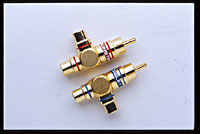
Of course, if you have a great outboard DAC (as I do), you may be better off running things in from your DAC with the JVC setting on 'DVD Multi'. This is essentally 2 channel set-up (when only two channels are fed in) and DSP is disabled. You can then buy one of these (below - I just did, for other reasons, and will be in next week for evaluation) and split off another signal from your front end and use one of your gainclones to amplify the last 2 channels needed.
3rd option is, if your front end has separate outputs for 5 channels and sub, you can just run 4 channels to the JVC, set to 'DVD Multi' and run your 4 channels that way. My lowly Pioneer DVD 656 Player from 2002 does, so I suspect many DVD/CD players do now.
I know you mentioned you don't have passive crossovers. Usually this is a superior method, but the JVC busts thru simple crossovers like they don't even exist. You may not feel the need for active crossovers, and all the complication of it, with the JVC...depending on your room size, how loud you like to play and other factors.