Ricardojoa,
There has been only one other report of something like this, and the unit was returned for service. While there the reported issue could not be duplicated.
It then had the new firmware "re-installed" and still not able to reproduce.
It was thought that there was a glitch of some type in uploading the most recent firmware upgrade (maybe a bad connection, or too long or low quality USB cable or even something within the specific computer)
I received the following instructions:
What you need to do is to run the Firmware upgrade software again, or download the older version, just in case, but we haven't been able to find any bugs. Factory had performed continuously updating the firmware more than 20 times without having an issue.
To re-do the upgrade in the case of failed update, check the button: 'Re-Programming'
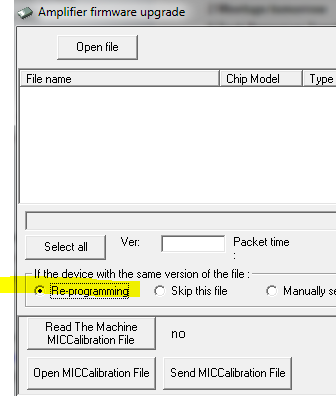
1) Try again, if same problem persists,
2) Try with a different PC/USB, change the USB port, change the USB cable (use a short one, don't use a 3-meter cable).
3) Try with the old firmware upgrade software (the Windows software, not the firmware itself.

