ALTERNATIVE THAT COMPETES WITH HIGH END STREAMERS

NXSTUDIO-DRUMMER

  • Full Member
  • Posts: 301
ALTERNATIVE THAT COMPETES WITH HIGH END STREAMERS
« on: 28 May 2026, 02:27 am »
PRIOR TO BUYING A STREAMING PLAYER, TRY THIS ALTERNATIVE FIRST.

 You don't need to spend $3,000 to $15,000 on a fancy, high-end commercial streamer. You can obtain pristine, bit-perfect audiophile performance using an old laptop you already have sitting in your closet and a cheap USB flash drive. Here is the step-by-step guide on how to build your own reference-grade music transport, plus a killer network upgrade that competes with the high-priced streamers.

Phase 1: Preparing Your Gear
To get started, you only need three basic items:

    1. An Old Laptop or PC: It doesn't need to be fast. Slower, older laptops actually create less electronic background noise! An old machine with a solid-state drive (SSD) and plenty of RAM is the ultimate setup. I'm using a old Dell Inspirion 5559 with updated SSD drive and 16Gb of ram. This 10 year old laptap is in perfect condition, and it's super quiet. Even if the cooling fan is running, from my listening position it's not audible. I barely hear it with my ear next to it.

    2. A USB Flash Drive: A basic 4GB or 8GB USB stick is plenty. You can use an existing one or buy a cheap one online. Even if you have a larger memory flash drive it will work fine too.
    3. Your Smartphone: You will use your phone as your remote control to scroll through your music tracks while sitting in your listening chair. Android or Iphone compatible
_______________________________________ _______________________________________ ______________________________________

Phase 2: Installing the Magic Software (Daphile) https://www.daphile.com/
We are going to use a free, ultra-lightweight operating system called Daphile. It completely bypasses Windows, meaning your laptop stops acting like a heavy, noisy computer and turns into a dedicated, silent music box.

Step 1: Download Daphile
On your everyday computer, open your web browser and go to the official Daphile website. Download the latest version of the software file (called an ISO file). It is incredibly small—only about 250 Megabytes!

Step 2: "Flash" the USB Drive
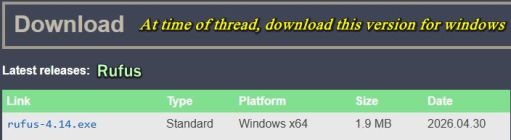
You cannot just drag and drop the file onto your USB stick. You need a free tool to install it correctly. Download a simple program like Rufus  https://rufus.ie/en/  (for Windows) or BalenaEtcher https://etcher.balena.io/ (for Mac/Windows).


    • Plug your USB flash drive into your computer.
    • Open Rufus or Etcher.
    • Select your downloaded Daphile file, select your USB stick, and click "Start" or "Flash."
    • In two minutes, your magic audiophile USB stick is ready!
_______________________________________ _______________________________________ ______________________________________

Phase 3: Firing Up the System
    1. Plug the USB Stick In: Take your newly flashed USB drive and plug it into your dedicated audio laptop.
    2. Connect Your DAC: Run your high-quality USB audio cable from the laptop directly into your DAC.
    3. Boot the Laptop: Turn on the laptop. You need to press a key right when it boots (usually F12, F11, or Delete depending on your brand) to enter the boot menu. Select "Boot from USB."
    4. The Silent Screen: Daphile will load entirely into your laptop's RAM chips. Once it loads, the laptop screen will go black or just show a simple text web address. You can now close the laptop lid and tuck it away in your audio rack. It is now a "Headless Server."
_______________________________________ _______________________________________ ______________________________________

Phase 4:  Controlling the Music From Your Phone
    1. Grab Your Phone: Make sure your smartphone is connected to your home Wi-Fi network.
    2. Open Your Browser: Open Safari or Chrome on your phone. Look at the laptop screen text or type http://daphile.local into your phone's browser address bar.
    3. Play Your Tracks: Daphile's beautiful control dashboard will instantly pop up on your phone screen! You can link your local music files or pull up your favorite high-resolution web streams.
    • Why this sounds so amazing: Because Daphile copies the entire music file into your laptop's RAM before playing it, the internal hard drive goes to sleep. Data is handed over to your DAC with zero software delay and zero background static.
_______________________________________ _______________________________________ _______________________________________

Phase 5: The "Next-Level" Network Upgrade (Using this in tandom with above, steps up the quality of the signal path significantly.)
If you want to completely finish off the job and unlock a massive, deep 3D soundstage with a dead-silent background floor, you need to fix your home network noise.
Standard home internet routers use cheap plastic switching power plugs that inject loud, high-frequency electrical "hash" directly onto your network lines, causing digital glare in your speakers.

The Network Fix:
    1. Get a Linear Power Supply (LPS): Buy an industrial-grade Regulated Linear Power Supply that matches the exact voltage of your home router (usually 12V).
    2. Power the Router Cleanly: Throw away the router's cheap factory plastic power brick and plug it into your new linear supply. This acts like an electronic concrete barrier, trapping 100% of the wall-power noise.
    3. Hardwire via Ethernet: Do not use Wi-Fi for your audio laptop. Plug a high-quality, solid-core Ethernet Cable directly from your newly cleaned router straight into the network port of your Daphile laptop.

The Sonic Result
By hardwiring your network and feeding your router clean linear power, your digital front end is completely isolated from electrical noise. The data flowing into your DAC's clock network is perfectly pure. When that signal hits your sound system, the background hiss disappears completely. Your speakers will paint an incredibly wide, deep, lifelike 3D image where instruments float precisely in thin air. You get explosive, tight low-frequency bass tracking—even at quiet, moderate listening levels.

-----------------------------------------------------------------------------------------------------------------------------------------------------------------

Setting up phone

  Step 1: Get onto the Same Wi-Fi Network

Daphile works like a private radio station inside your house. For your iPhone to talk to the laptop, they must be connected to the exact same home internet network.
• Make sure your iPhone’s Wi-Fi is turned on and connected to your main home router.

  Step 2:  Open the Daphile Site on Your iPhone

    1. Open the Safari app (the web browser icon that looks like a blue compass) on your iPhone.
    2. Tap the long search/address bar at the bottom of the screen.
    3. Type in this exact address: http://daphile.local and hit the blue Go button on your keyboard.

• Troubleshooting Trick: If that address doesn't pop up after a minute, look at your laptop screen. It will display a series of numbers called an IP address. Type your exact numbers into your iPhone's Safari bar instead, and hit Go.

  Step 3: Turn it Into a Permanent "App"

 Because Daphile doesn't have a regular app in the Apple App Store, you can make your own shortcut so you never have to type that  web link again:
    1. While looking at the Daphile screen in Safari, tap the Share button at the bottom of your iPhone screen
      (it looks like a square with an arrow pointing up).
    2. Scroll down the menu and tap "Add to Home Screen."
    3. Type in the name "Daphile" and tap Add in the top right corner.

• The Result: A neat little icon will appear directly on your iPhone screen alongside your regular apps. Now, you can just tap it like a normal app to instantly jump to your music!

  Step 4: How to Use the Daphile Screen (Easy Terms)
     When the screen opens on your iPhone, it is split into a few simple sections. Here is how to navigate it without any guesswork:

1. The Left Side Menu (Finding Your Music)

Tap the menu bars to find what you want to play:

• My Music: This is where you click if you want to play audio files saved on your laptop. You can browse by Artist, Album, or Folder.
• Internet Radio: This is your portal for web streaming. Click this, then look for a button called "URL" or "Add Custom Station." This is where you copy and paste the lossless FLAC streaming link for Audiophile.fm!

2. The Center/Right Side (Choosing Your DAC)

Before hitting play, you need to tell Daphile where to send the music:

• Look for the "Settings" tab (usually a gear icon) and click "Audio Player."
• You will see a list of audio outputs. Look for your connected device (it will currently show what ever dac your using).
   Tap the checkbox next to it to select it. This locks the laptop's USB port directly to your DAC.

3. The Bottom Bar (Playing the Music)

Once you click a song or your Audiophile.fm station https://audiophile.fm/, or what ever station you wish to use, to control it using the standard buttons at the very bottom of your screen:

• Play / Pause / Skip: Standard tape-player style shapes.
• The Volume Slider: Leave this slider turned all the way up to 100% (Maximum) inside the Daphile software.

Note: Phone batter charge levels, have absolutely no detremental affects on the audio, it soley functions as a remote control. Also don't use the phone for attenuating the signal, it slices off bottom bits of your music file resolution. :nono:

Enjoy

Putting some perspective regarding topic, this is a "BUDGET ALTERNATIVE." Never claimed it's the holy grail!
« Last Edit: 28 May 2026, 04:31 pm by NXSTUDIO-DRUMMER »

Early B.

Re: No streamer player, no problem here's an alterntive
« Reply #1 on: 28 May 2026, 03:11 am »
FANTASTIC!!!!  I'm really, really interested in reading feedback on this. It may be worth spending $200 on a new or used laptop to make this happen if you don't already have one. 

BrandonB

  • Full Member
  • Posts: 559
Re: ALTERNATIVE THAT COMPETES WITH HIGH END STREAMERS
« Reply #2 on: 28 May 2026, 04:55 am »
PRIOR TO BUYING A STREAMER PLAYER, TRYING THIS ALTERNATIVE FIRST.

 Is this what Danny and Ron talked about on their live podcast?  I assume you run the laptop from the battery not plugged in?  Can you also do this from a mini pc?

NXSTUDIO-DRUMMER

  • Full Member
  • Posts: 301
Re: ALTERNATIVE THAT COMPETES WITH HIGH END STREAMERS
« Reply #3 on: 28 May 2026, 05:16 am »
PRIOR TO BUYING A STREAMER PLAYER, TRYING THIS ALTERNATIVE FIRST.

 Is this what Danny and Ron talked about on their live podcast?  I assume you run the laptop from the battery not plugged in?  Can you also do this from a mini pc?

Brandon
I haven't seen the video your referring to, so I'm not sure what they discussed. I know a while back, Danny had a buddy who modified old Mac Mini's. Basically optimized them for audiophile quality. If I recall it was pretty involved, not sure if he still provides the mod service or not.

BrandonB

  • Full Member
  • Posts: 559
Re: ALTERNATIVE THAT COMPETES WITH HIGH END STREAMERS
« Reply #4 on: 28 May 2026, 01:42 pm »
Brandon
I haven't seen the video your referring to, so I'm not sure what they discussed. I know a while back, Danny had a buddy who modified old Mac Mini's. Basically optimized them for audiophile quality. If I recall it was pretty involved, not sure if he still provides the mod service or not.
This is a coincidence because I watched a video of Danny and Ron doing a livestream last night.  He said he has some video's coming out about setting up streamers cheaply.  He and some friends did some testing on what actually works. After seeing your post I thought you might had been involved.   

NXSTUDIO-DRUMMER

  • Full Member
  • Posts: 301
Re: ALTERNATIVE THAT COMPETES WITH HIGH END STREAMERS
« Reply #5 on: 28 May 2026, 02:05 pm »
That sounds good Brandon,
If Danny & Ron have a configuration that's works even better, that's a win win for the AC community.  :thumb:

nlitworld

  • Full Member
  • Posts: 2914
  • Strange things are afoot at the Circle K
Re: ALTERNATIVE THAT COMPETES WITH HIGH END STREAMERS
« Reply #6 on: 28 May 2026, 02:26 pm »
I'll have to check out that livestream. Ron and Danny together is always educational. I do know Rich (HAL) has his MS-6 with the upgraded GAN power supply that works fantastic as an inexpensive optimized streamer. Hard part of PC playback is you can often hear electrical noise from components themselves, especially with fans or spinning hdd. Optimized laptops sit somewhere in the middle. There's a fine balance of enough computing power to run programs and processes easily without the burden of advanced cooling and power limiting electrical noise.

I've tried several programs that do some advanced trickery with bypassing windows features but not daphile. I ended up coming back to F2K due to convenience and sounding 95% as good. You can run it headless with remote program once everything is all set up which is nice too. I'll have to try out daphile this weekend and see what I think. Thanks for the idea!

goggle1824

Re: ALTERNATIVE THAT COMPETES WITH HIGH END STREAMERS
« Reply #7 on: 28 May 2026, 03:09 pm »
I’m “old school”, I spin cds. 😅😂😇

Doublej

  • Full Member
  • Posts: 2813
Re: ALTERNATIVE THAT COMPETES WITH HIGH END STREAMERS
« Reply #8 on: 28 May 2026, 03:11 pm »
Stellar inexpensive audio streamer = WiiM. In the US, a refurbished WiiM Pro with fully warranty from WiiM is often available on their eBay store for $105.

Early B.

Re: ALTERNATIVE THAT COMPETES WITH HIGH END STREAMERS
« Reply #9 on: 28 May 2026, 03:29 pm »
Questions:
1. Does the laptop/desktop in this scenario need an LPS?
2. My streamer is connected to a network extender (Mesh). Is noise an issue with extenders? 
3. I have a network switch and a router. Do I need an LPS for both?
4. What's your perspective on replacing Ethernet cables with fiber optic cables to reduce noise?

NXSTUDIO-DRUMMER

  • Full Member
  • Posts: 301
Re: ALTERNATIVE THAT COMPETES WITH HIGH END STREAMERS
« Reply #10 on: 28 May 2026, 04:21 pm »
Questions:
1. Does the laptop/desktop in this scenario need an LPS?
2. My streamer is connected to a network extender (Mesh). Is noise an issue with extenders? 
3. I have a network switch and a router. Do I need an LPS for both?
4. What's your perspective on replacing Ethernet cables with fiber optic cables to reduce noise?

1. LPS never hurts to have, cleaning up power source. It's a option
2. This presents a different challenge, Jitter and latency
3. Sometimes intense local radio frequency interferences can bleed through the air directly into your streamer's sensitive analog output stages or DAC components, raising the overall audio noise floor. Keep it separated from your streamer a few feet. You could also use a fiber media converter.
4. You will have no noise and it's faster, but it's more fragile too. If your running short runs like me, I would use a nice quality ethernet cable

nlitworld

  • Full Member
  • Posts: 2914
  • Strange things are afoot at the Circle K
Re: ALTERNATIVE THAT COMPETES WITH HIGH END STREAMERS
« Reply #11 on: 28 May 2026, 04:56 pm »
If your running short runs like me, I would use a nice quality ethernet cable

Not to get off topic far, but surprisingly enough BJC ethernet cable made a nice improvement in my system. I'm sure the sky's the limit from there, but a cost effective stepping off point for myself.

Tyson

  • Full Member
  • Posts: 11733
  • Without music, life would be a mistake.
Re: ALTERNATIVE THAT COMPETES WITH HIGH END STREAMERS
« Reply #12 on: 28 May 2026, 05:13 pm »
This is very similar to what I do, but with Roon instead of daphile.  And a NUC instead of an old laptop.  But the core idea is the same.  Strip out Windows/Mac OS and run a stripped down dedicated audiophile OS. 

WGH

Re: ALTERNATIVE THAT COMPETES WITH HIGH END STREAMERS
« Reply #13 on: 28 May 2026, 05:22 pm »
Remove the hard drive from the laptop for a increase in clarity. The old spinning mechanical hard drives are electrically noisy.

I started streaming music in 2006 the same way almost everyone did, from an old laptop (now long gone). I'm now on my 3rd computer streamer which is hard wired and includes two Acopian linear regulated power supplies. My music server runs Windows 11, JRiver as the library interface and HQPlayer.

A Computer Audiophile thread around 2014 mentioned using an Anker battery on the hard drive to reduce electrical noise. I tried it and it worked beautifully, unfortunately the battery power was always low whenever I wanted to listen, keeping it fully charged was a PIA. An Acopian power supply fixed that problem. I added an illuminated off/on switch to power off the SSD when not in use and let me know when it is on.

I never used a battery or other separate power supply with the laptop. Removing the hdd will have the same result of eliminating a source of noise.

NXSTUDIO-DRUMMER

  • Full Member
  • Posts: 301
Re: ALTERNATIVE THAT COMPETES WITH HIGH END STREAMERS
« Reply #14 on: 28 May 2026, 06:01 pm »
Some good idea's being presented, I'm intruqued with WGH's arrangement. I just finished listening to Danny and Ron's recent YT video. They touched base regarding this topic. Sounds like Danny has another alternative as well.

WGH,
Care to provide a little more in depth details, regarding your current set up, and how someone could go about assembling their own equipment ideally like yours? Sounds like a winning combination. :thumb:


Tyson, your configuration is also another good alternative as well.  :thumb:

mkrawcz

  • Full Member
  • Posts: 722
Re: ALTERNATIVE THAT COMPETES WITH HIGH END STREAMERS
« Reply #15 on: 28 May 2026, 07:40 pm »
I find that a Raspberry PI 5 with a nvme addon running Volumio powered by a linear PSU does as good as anything I’ve heard.

WGH

Re: ALTERNATIVE THAT COMPETES WITH HIGH END STREAMERS
« Reply #16 on: 28 May 2026, 08:26 pm »
I have been building my own computers since 1997, putting them together is fairly straightforward but there are usually one or two gotchas. I don't think any booted the first time but the problem was always user error. My current server is fanless which both the BIOS and Windows found confusing until some startup settings were changed.

I have a July 2021 thread about to build an affordable high-end music server. I'm still using the same server. The thread also has a couple links to the original C.A.P.S v2.0 and my C.A.P.S build that used a integrated Intel Atom D525 chip that is plenty powerful for streaming.
https://www.audiocircle.com/index.php?topic=177495.msg1867916#msg1867916


August 2021 - I was one of the Beta testers for the new Hapa AerØ USB cables. Over the years I borrowed many USB cables and digital purifiers/cleaners from the guys in our audio club and the Hapa AerØ USB bested them all by a wide margin. I bought the review sample. Then wrote a review:
https://www.audiocircle.com/index.php?topic=177847.msg1871434#msg1871434


July 2022 - The music server was designed to play with hi-res recordings, both downloaded and upsampled. HQPlayer requires a more powerful chip than an Intel Atom to upsample to DSD256. I prefer the sound of DSD to PCM, the digital edginess is gone and music has more depth, space and solid center image. A low noise system and USB card with excellent cables and speakers capable of resolving nuances help a lot. I wrote a long HQPlayer review.
https://www.audiocircle.com/index.php?topic=182724.msg1919415#msg1919415


I upgraded the USB card in December 2024 to a JCAT Femto which made a noticeable improvement. Here is my review:
https://www.audiocircle.com/index.php?topic=190790.msg1996428#msg1996428


My affordable high end music server is now up to $2720 including JRiver and HQPlayer, the parts cost is outdated by 5 years and pre-tarrif. I read reviews about $10,000 music servers and the parts and software are not much different than in my server and none use HQPlayer so their upsampling is not as state-of-the-art because including a powerful chipset in a server costs a lot more to implement. A DAC that can handle an upsampled music file without screwing it up is another factor, most all DACs upsample in the background, that is why I have the HoloAudio DAC which is NOS.

What's the difference in file size between a native DSD256 and 44.1 WAV file of the same song? I have native DSD256 music from 2L-The Nordic Sound. The original file size of one song is 827 MB, the converted wav file is 51.7 MB, a decrease of 93.75%. That's a lot of notes and low level information that has gone poof in the conversion. Technology marches on, even the $220 Shanling EC Play Portable CD Player can play native DSD256.


A cost effective alternative would be to use the laptop server to feed a PS Audio DirectStream DAC MK2. The music would be very close to state-of-the-art.


Tyson

  • Full Member
  • Posts: 11733
  • Without music, life would be a mistake.
Re: ALTERNATIVE THAT COMPETES WITH HIGH END STREAMERS
« Reply #17 on: 28 May 2026, 09:38 pm »
It's interesting.  I notice over time I've moved away from DSD DACs and toward redbook only DAC's.  And not because I didn't have DSD files, I had thousands.  Practically I found I ended up streaming most of the music I listened to and went toward DACs that were optimized for redbook.  I now run an Audio Note Kit 4.1 for my HT setup downstairs and an Abbas Audio 5.0 DAC for my music system upstairs. 

Jason too.  He has moved his Holo May into his headphone setup as his 2nd system and has an ANK for his main music setup too. 

I finally got him to try out a Type 45 amp in his system and it's kicked the 300b amp to the curb.  Same for me, almost all my listening is on very low powered tube amps.  It's like our systems have time travelled backward, lol.

goggle1824

Re: ALTERNATIVE THAT COMPETES WITH HIGH END STREAMERS
« Reply #18 on: 28 May 2026, 10:11 pm »
Tyson, sort of like everything that “was old” is new again… 😅🤔🤫

Really great recent additions by the way Gents, very interesting stuff!

WGH

Re: ALTERNATIVE THAT COMPETES WITH HIGH END STREAMERS
« Reply #19 on: 28 May 2026, 10:52 pm »
Three guys in our audio club use ANK DACs, all have been built using premium parts which is sort of gilding the lily. Two ANK 5.1's and a 2.1; they held a comparison and the 5.1 and 2.1 sounded very similar.

Upgrades included:
Silver (.999) signal wire 16 gauge, instead of 18 gauge supplied copper
High voltage and high current hookup wire 16 gauge
Six 1/4 watt resistors on Super Regulator board replaced with 1 watt
Basic rubber feet replaced with large aluminium/rubber footers
Small rubber washers for mounting power transformers and chokes
Super-Reg board: United Chemi-con capacitors replaced with audio Elna Silmic of same values
Analog board: United Chemi-con capacitors replaced with audio Elna Silmic
Front-mounting rotary switch and gold knob optional addition instead of rear toggle
V-Caps upgrade from Audionote caps, purchased from ANK (suggestion from Brian at ANK)
Fourteen Non-magnetic Tantalum resistors all replaced on analog board, from ANK (I love these resistors for signal paths)
USB board: WaveIO with latest clock instead of supplied Chinese brand of questionable origin?


I think that for 44.1 kHz and 96 kHz the ANK DACs can't be beat. The HoloAudio DACs really come into their own when playing DSD and upsampled DSD with HQPlayer, it's all the filter choices in HQPlayer that make a difference.

I'm the only member out of 12 in our audio club that does hi-res. I get to hear a lot of 44.1 NOS music, it sounds just fine. One member has a custom state-of-the-art reel-to-reel so we actually have a point of reference what a recording should sound like, tapes are still the gold standard.